Free & open-source DJ software for Windows

Two decks. Zero paywalls. One stubborn ex-DJ.

StentorDecks is what happened when a developer who used to play records got tired of DJ software asking for his credit card. Automatic BPM & key detection, beatmatched waveforms, a SYNC that behaves, native Hercules RMX2 support — and MIDI learn for every other controller. Yours, for nothing, forever.

no account · no trial · no telemetry games · it even fixes your broken MP3s

01Liner notes · why this exists

Built in the booth, not in a boardroom

My Hercules RMX2 spent years in a flight case under the stairs. Life happened. The case gathered dust; the itch never left.

When I finally plugged it back in, the software world had moved on without asking me: subscriptions, mandatory accounts, cloud lockers, the good features behind a paywall. My controller worked fine. Everything around it had become a shopping cart.

So I did the thing developers do instead of complaining. I wrote my own. Not a toy — a complete DJ system: a real-time dual-deck audio engine, a library that analyses BPM and key while you sleep, and an interface designed to be read from a meter away in a dark booth, with beer in the air and no time to squint.

It was born on the RMX2 — every knob, fader and jog wheel mapped the way the hardware deserves. But it grew: with built-in MIDI learn and community profiles, it now plays nice with other controllers too. And because this grew out of stubbornness rather than a business plan, it's free, open source, and always will be.

“Named after Stentor, the Greek herald whose voice carried like fifty men. Your mix should carry at least that far.” — why the name
02What's in the box

Everything you need to mix. Nothing to unlock.

The whole feature set, from the first download — no “pro tier,” because there is no tier. These seven are also why the app exists next to refusing paywalls: each one is a design choice we refused to shrug at. Booth notes — the reasons →

03Look inside

Designed for the dark

High contrast, big meters, zero clutter. The interface should disappear; the music shouldn't. Screenshots refresh from the open-source repo when the UI changes.

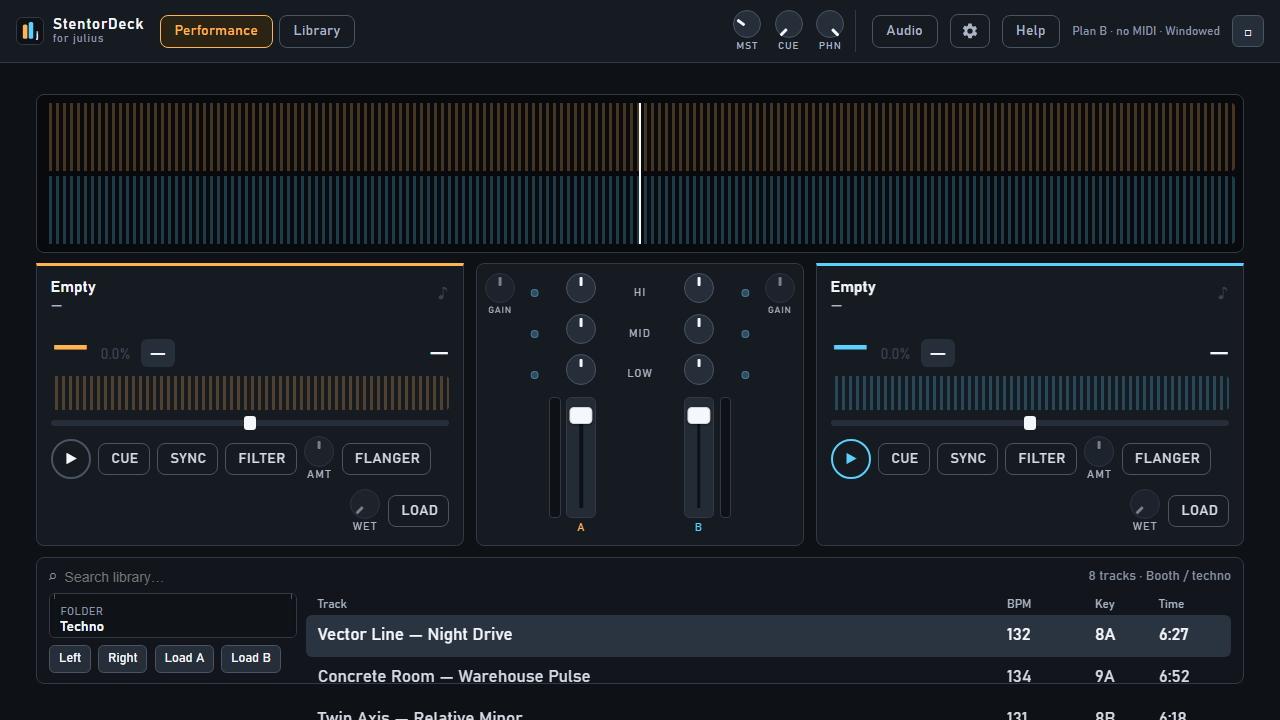
StentorDecks performance mode: two decks with scrolling beatmatched waveforms and a central mixer
A1 — performance mode · two decks, scrolling waveforms, central mixer
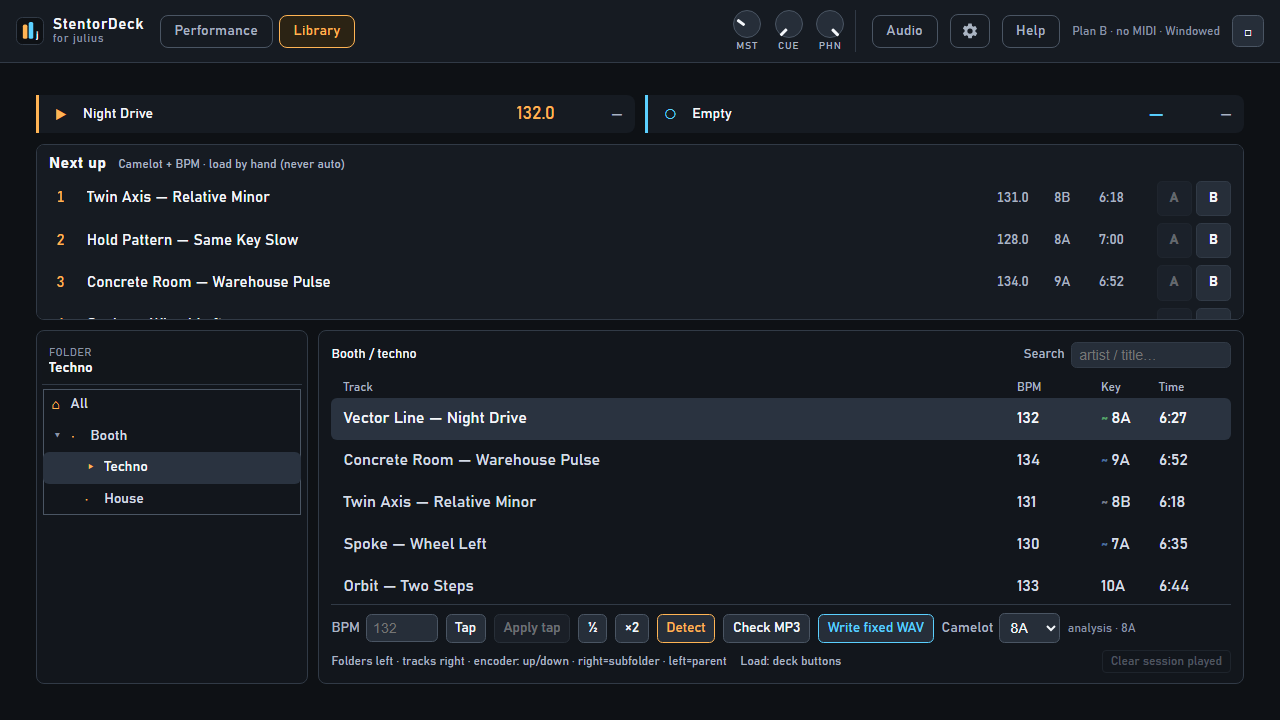
StentorDecks library mode with dual-pane music library browser showing BPM and key columns
A2 — library mode · dual-pane browsing, BPM & key on every track
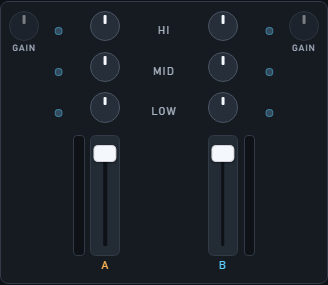
StentorDecks mixer column with channel faders, EQ and VU meters
B1 — the mixer column · faders, EQ, VU metering with peak hold
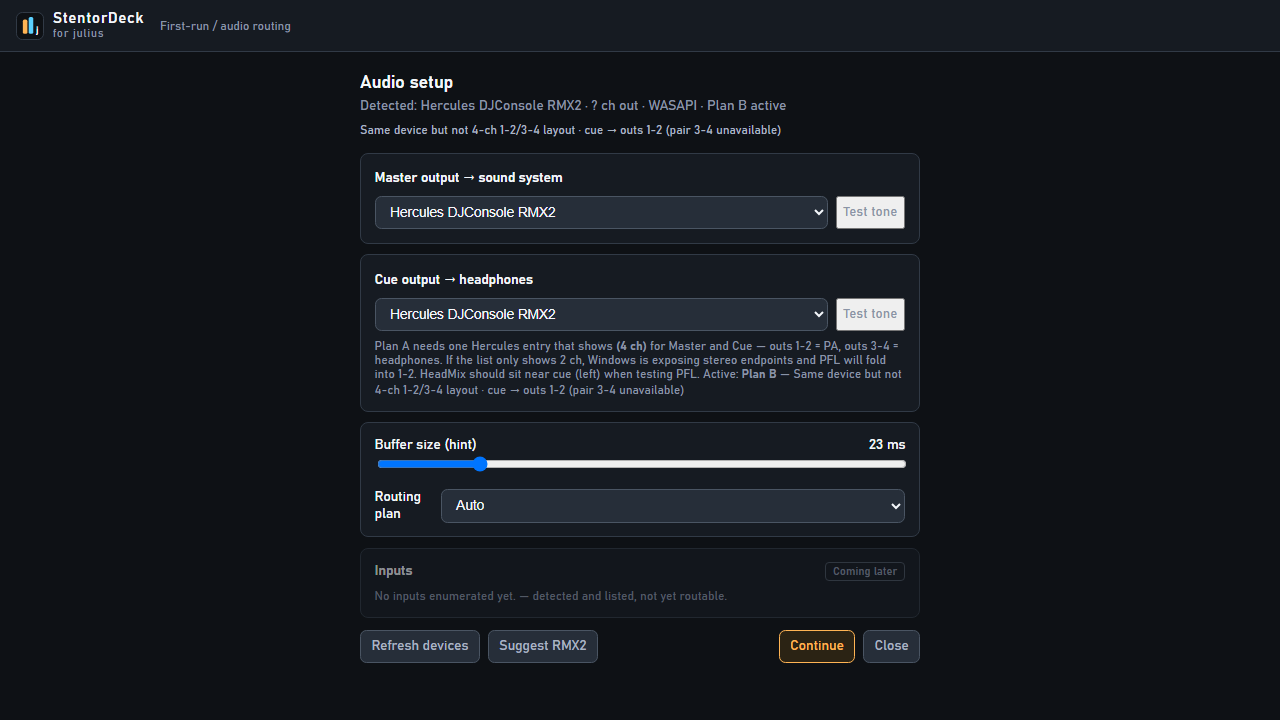
StentorDecks audio setup screen for routing master and headphone outputs
B2 — audio setup · route master and headphones anywhere
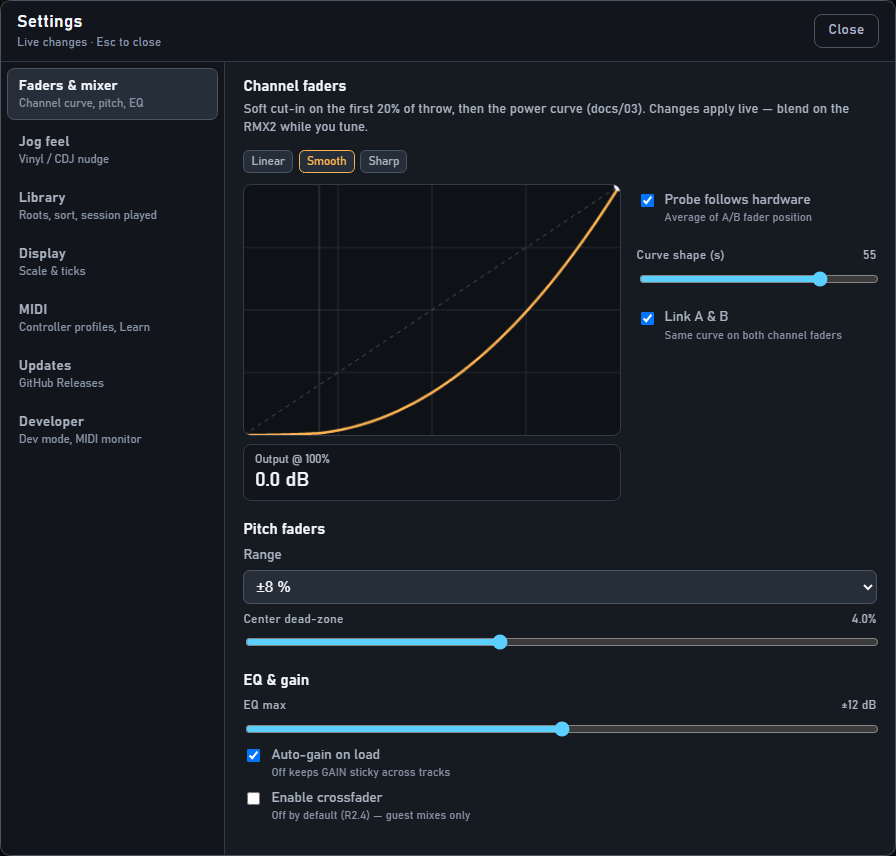
StentorDecks settings: channel fader curves, pitch range, EQ and gain — applied live
B3 — settings · faders & mixer · channel curve, pitch, EQ. Live changes
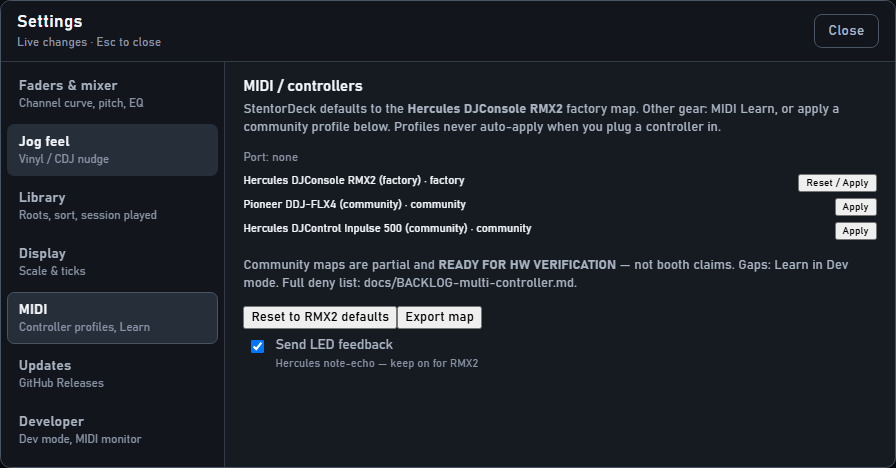
StentorDecks MIDI settings with controller profiles and Learn
B4 — settings · MIDI · RMX2 factory map & community profiles
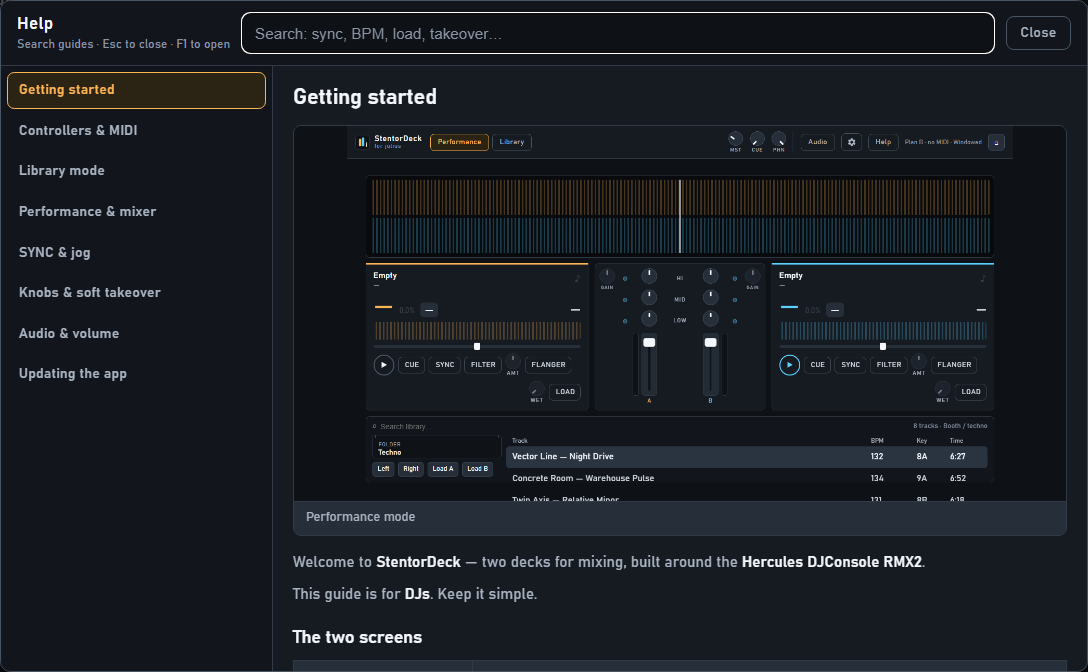
StentorDecks in-app Help panel with searchable guides
B5 — in-app Help · searchable guides (F1)
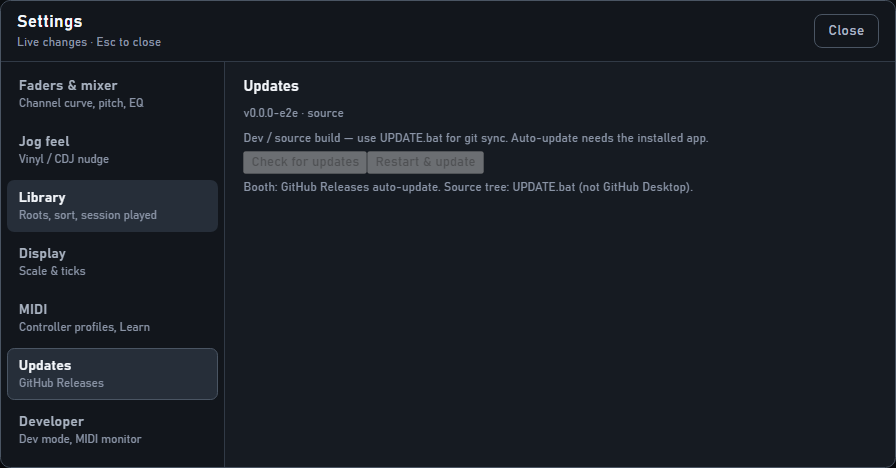
StentorDecks updates settings checking GitHub Releases
B6 — settings · updates · GitHub Releases

Full screenshot catalog in Docs → · sourced from docs/screenshots/ on GitHub

04Your controller

Born on the RMX2. Not married to it.

StentorDecks was designed around the Hercules DJConsole RMX2 — but it was never meant to stay exclusive.

THE OG native · plug and play

Hercules DJConsole RMX2

The controller this whole thing was built around. Every jog wheel, fader, EQ knob and pad mapped out of the box, with soft takeover so the software never jumps when you touch a control. If you own an RMX2, this is the software it always deserved.

MIDI learn · map anything

Everything else with a MIDI port

Any MIDI DJ controller can drive StentorDecks. MIDI learn maps your hardware in minutes — jogs, faders, EQs, buttons — with the same soft-takeover manners. DJ guide: Controllers & MIDI — community profiles for the Pioneer DDJ-FLX4 and Hercules DJControl Inpulse 500 included. No controller at all? Keyboard and mouse work too.

05Under the hood

Read every line before you trust it with your set

The complete source code is public on GitHub. File a bug, request a feature, or build the whole thing yourself — the installer everyone downloads is produced from code anyone can read. That's the deal.

TypeScript Electron React 18 Web Audio Web MIDI SQLite ~200 tests
Nerd article: why it’s stubborn → Browse the source →
06Press play

Free. As in actually free.

No trial, no account, no "pro tier". Download the installer, plug in your controller, play. That's the whole funnel.

↓ Download StentorDecks for Windows

Latest version, straight from GitHub Releases.

1Download & install

Grab the installer above. Windows 10/11. If SmartScreen pops up: More info → Run anyway, once per machine. Details in the FAQ.

2Add your music

Point it at your folders. BPM, key and waveforms get analysed in the background while you make coffee.

3Plug in & play

RMX2 works instantly; anything else maps in minutes with MIDI learn. Updates arrive by themselves.

07Questions from the floor

Fair questions, straight answers

Is StentorDecks really free?

Yes — actually free. No trial that expires, no features behind a paywall, no account, no card details. The full source code is public on GitHub. This started as a personal itch, not a business plan, and it shows in the price.

Does StentorDecks only work with the Hercules RMX2?

No. It was born on the Hercules DJConsole RMX2, so that controller works out of the box — every knob, fader and jog wheel mapped. But any MIDI DJ controller can drive it: built-in MIDI learn with soft takeover maps your hardware in minutes, and community profiles for the Pioneer DDJ-FLX4 and Hercules DJControl Inpulse 500 are included. No controller at all? Keyboard and mouse work too.

Read more: Controllers & MIDI · Knobs & soft takeover.

Which operating systems does StentorDecks support?

Windows 10 and Windows 11 — that is the supported booth product. Normal installer, auto-update via GitHub Releases. Start here: Get started · Updating.

There is no official Mac installer. If you have a Mac and still want to poke at the source (unsupported): macOS from source (DIY).

Does StentorDecks analyse BPM and musical key automatically?

Yes. Point it at your music folders once and it does its homework in the background: waveforms, beatgrids, BPM and musical key for every track. There is even a click-and-squeak remover that repairs damaged MP3s, so your oldest rips play clean.

How to use Library mode (folders, BPM/key fixes, Detect): Docs → Library.

Windows SmartScreen warns me about the installer. How do I install it?

The builds are not code-signed yet, so the “Windows protected your PC” message is expected. The workaround takes two clicks:

  1. Click More info.
  2. Click Run anyway.

You only need this once per machine per download — for the Setup.exe, and sometimes once more on the first launch of StentorDeck.exe. If your browser blocks the download itself: choose KeepShow moreKeep anyway.

Full write-up (and how auto-update works): Docs → Updating. Please don't switch off SmartScreen or Defender — you never need to. Until there is a code-signing certificate, the entire source is public on GitHub.

Where do I get support, report a bug or request a feature?

Everything runs through the GitHub issues page. Bug reports, feature requests, questions — open an issue and it lands directly on the developer's desk. There is no forum, no ticket system and no chatbot maze; it's one DJ-developer and an issue tracker.

Operator how-tos live under Docs & guides (same pages as in-app Help).